
Forum
Notifications
Clear all
LUA Scripting
1
Posts
1
Users
0
Reactions
205
Views
Topic starter
20/07/2026 8:21 am
Hi everyone,
If you are developing custom Lua scripts for StartDiag and want to protect your intellectual property, you can easily encrypt your code and lock it so it only runs on a specific customer's hardware unit.
Here is the step-by-step workflow to compile and deliver a hardware-locked script:
1. Retrieve the Client's Serial Number (S/N)
First, your customer needs to extract their unique hardware identification. Instruct them to perform the following steps on their device:
-
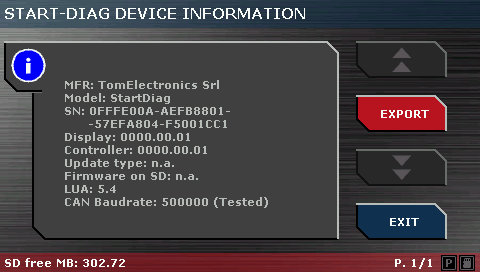
Navigate to: Main Menu -> Info -> StartDiag Information -> Export.
-
This will generate a file named
SDSystem.txtcontaining their unique controller details. Ask the client to send this file (or the S/N inside it) to you via email.
2. Develop Your Lua Script
Create and test your script using the built-in editor in the PC Suite or your preferred external Lua IDE.
-
Pro Tip: For an extra layer of protection, you can hardcode a check inside your Lua script to verify the specific vehicle's VIN before executing any critical diagnostic routines.
3. Encrypt and Lock via PC Suite Compiler
Once your code is finalized, it is time to secure it:
-
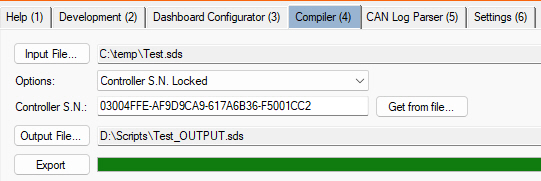
Open the "Compiler" workspace within the PC Suite.
-
Input the customer's hardware S/N that you received in Step 1 ("Get from file" button or type it manually).
-
Select the output format option: "Controller S.N. Locked".
-
Run the compilation process to generate the protected, encrypted file ("Export" button).
4. Deliver the Script
Send the newly generated output file directly to your client.
The script is now completely secure. The raw code cannot be read or reverse-engineered, and it will only execute on the specific StartDiag controller matching that exact Serial Number. If transferred to another device, the script will strictly refuse to run.
Feel free to reply to this thread if you have any questions about the compilation process or managing secure script deployments!
This topic was modified 2 months ago 3 times by TomElectronics
This topic was modified 2 months ago by StartDiag